Rss Feed Like Us on facebook Google Plus

March 29, 2012

Reduce the File Size of Google Fonts for your Website

Google Fonts is a collection of open fonts that you can use in your websites, documents and other design projects without any restrictions around licensing.
It takes a single line of code to embed any of the Google Font families into your website design. Just substitute the font family in the following code (line #2) with the name of Google Font and copy-paste it inside the <head> tag of your HTML template.
<link href="http://fonts.googleapis.com/css?family=GOOGLE_FONT_FAMILY_NAME" rel="stylesheet" type="text/css" />

Google FontsPage Speed and Google Web Fonts

While Google Fonts can make your website look good, there’s one related problem – they increase the page load time of your website because the font files have to downloaded on the visitor’s computer and some of them, like the Cabin Sketch font, can exceed 100 KB in size.
There is however an easy workaround to help you reduce the file size of the Google Fonts so that they do not reduce the load time of a web page. Instead of using the entire Google font family, you can specify a limited set of letters or digits that are used in your text and Google will dynamically generate a new font file containing only the requested characters.

How to Reduce the Size of Google Font Files

All you have to do is add a new text parameter to the Google font request URL and value of this parameter will have all the letters that you need.
For instance, if I need to render the text Digital Inspiration in Cabin Sketch font, the modified CSS requesting the Google font file will look something like this:
<link href='http://fonts.googleapis.com/css?family=Cabin+Sketch&text=DigitalInspiration' rel='stylesheet' type='text/css' />
The original Google font file was around 101 kb but with this limited text, the font file is reduced to 7.6 KB.
google_fonts_characters
Google Fonts are commonly used to render the text of logos and and headings (h1, h2, h3, etc.) on a web page so you can modify the CSS accordingly. Alternatively, if you wish to request all alphabets and numerals in the Google Font but none of the extra glyphs, your font CSS will looking something like this:
<link href='http://fonts.googleapis.com/css?family=Cabin+Sketch&text=1234567890ABCDEFGHIJKLMNOPQRSTUVWXYZabcdefghijklmnopqrstuvwxyz%20' rel='stylesheet' type='text/css' />
The font file in this case is 37 KB in size and that’s still 64% lower than the original Google font file. Also, if you are wondering why I have included %20 in the text list, it represents the encoded space character. Similarly, you can add %27 and %22 to the list for single quote (‘) and double quote (") respectively.

Read More

March 26, 2012

Happy Birthday Sachin Tendulkar [pics]

Coming 24th April is Sachin's Birthday so Wish Him
Famous Quotes on Sachin


Read More

Poem on Sachin Tendulkar

To,
Dear Sachin Tendulkar,

With the passing sands of time, the moving clouds, the blowing breeze,the materialistic world comes to a stand still;
To greet you, to pray for you, to bless you;
In this world of unknown few people become so special, so their deeds, so their birthday;
This birthday we call it as a hey day;
A blissful day, a cheerful day;
This is your’s heyday, this is our hey day;
We celebrate you, we emulate you;

Every new time, gives the reason to hope, a hope to rope the seasons to come;
The hope that is faith, the faith that is power;
The faith is magnanimous, the power is unanimous;
A nation inspires by you, a nation swears b you;
A nation rejoices you, a nation stands by you;
The hope is you, the power is you;
The hope when turns into smile gives rush for miles in the lives of us;
The hope when turned into a tear brings the hush of fear in the lives of us;
The faith, when turns into courage bring the gush of enthusiasm in the lives of us;
The emotion is you, the emotion is you;
The equanimity you show in the face of adversity, the simplicity you show in the face of complexity;
When the nation’s demand becomes your command;
The demand to place the nation’s pride on the pedestal;
You lead us stoically, showing no pains, for nation’s gain;
We feel grateful, we feel heart filled;
The attitude is you, the gratitude is you;

When the things don’t work within us, we feel dejected;
When the things don’t work for our happiness we feel rejected;
We try to search happiness through others;
Few people come across to entertain us; few come across to shower happiness on us;
The entertainment is ephemeral, the happiness is eternal;
The happiness is you, the happiness is you;
It’s very difficult to match the standards set by an individual;
It’s very ideal to follow the path set by an individual;
You inspire us in many ways, yet remain simple;
You deeds speak in volumes, yet you remain simple;
The inspiration is you, the inspiration is you.
Read More

Sachin Tendulkar 100 Not Out [Records]

India's Prime Minister Manmohan Singh was amongst the first to wish Tendulkar and said he has made the country proud. "Tendulkar's long career has been a triumph of class, character and courage. I wish him many more innings and feats to continue inspiring the youth," Singh said in a press release.
Wish Sachin on His 39th Birthday
Tendulkar was also congratulated by ICC Chief Executive Haroon Lorgat said he is a marvel to cricket lovers around the world, adding he is a true role model. "On behalf of every cricket fan around the globe I congratulate Sachin on becoming the first person to score 100 centuries for his country. This is indeed a magnificent feat and not likely to be easily emulated," Lorgat was quoted as saying in an ICC release.
Lorgat also said: "Like millions of others I have personally followed his career ever since he first played for India as a gifted 16-year-old and now, more than two decades later, his passion and personal records, which include more than 33,000 runs at international level, is a modern day wonder." 

Sachin Tendulkar Stats...


Tendulkar scored his first international century - 119* - against England at Old Trafford in August 1990; while his first ODI century (110) came against Australia at Colombo on 9 September 1994.

Tendulkar scored 12 centuries in 1998 - the most he has in a year in his career. He has scored eight centuries in three different years (1996, 1999 and 2010).

Tendulkar, who is the most capped player in Tests and ODIs, holds an array of batting records including for the most runs and centuries scored in those two formats of the game. 

In his 188 Tests, Tendulkar has scored 15470 runs, including 51 centuries; and in his 462 ODIs, the batting maestro has scored 18,374 runs, including 49 centuries.

Tendulkar has scored 1000 or more runs in a calendar six times - 1997, 1999, 2001, 2002, 2008, 2010. He has also scored 1,000 or more ODI runs in a calendar year seven times - 1994, 1996, 1997, 1998, 2000, 2003 and 2007.
Read More

March 24, 2012

How to Copy Text from Images

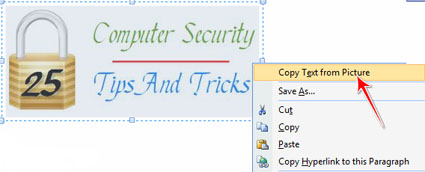
Most of the time, we require the Text part from images but unable to do that. Then what we do, just start typing the whole Text part by referring to the image. But now you can ignore the typing, you have the power to copy the Text part from directly image.


If you have Microsoft office installed in your computers, the best and the easiest way to copy text from image is to use Microsoft Office OneNote.

Following steps can help you to copy text from image through Microsoft Office OneNote:

 1. Run Microsoft Office OneNote. (Start->All Programs->Microsoft Office-> Microsoft Office OneNote.)
 2. Now, copy the image and simply paste it in Microsoft Office OneNote.
 3. Select the entire image and right click on the selection.
 4. Then, select “Copy text from image option”.


 5. Now open any word document and paste the content over there.
 You can now format or edit the content in your word document and save the favorable data.
It might have happened quite often that you really like the text from a scanned image and you wanted to copy it. For that you can either re write the whole text which might be a bit time consuming or you can use OCR (Optical Character Recognition) software.

OCR makes it possible to edit the text, search for a word or a phrase or store it more compactly, it also recognizes handwritten, printed or typewritten text.
Read More

Angry Bird Space is now available for download


The new Angry Bird Space game has been released by Rovio for which people have been waiting from long time. Angry Bird Space for iPhoneiPad and iPod touch is now available for Download from iTunes App Store.

Download Now

The application is available on Android, iOS, Mac and Personal computer devices for $99.Rovio promises regular free updates for the future and says that the game play has been fully optimized for each device, including full support for the Retina display on the new iPad.

According to the review, keeping and maintaining the original intent of the game- the players are going to have new power ups and some zero-gravity excitement.

With added sense of adventure, the new game is featured with 60 stages, in addition to Danger Zones for those. The extra stages are also available as an in-app purchase. The game is featured with hidden bonus levels and beautiful detailed background.

Screenshots


Read More

March 23, 2012

10 Futuristic Technology to Debut Soon

A number of technological innovations that we only saw in comics and sci-fi novels have come to see reality in the past decade. But if you wonder whether anything could be done to make the present more futuristic, this collection is one that you will have to see to believe.


Here are some of the most futuristic products, according to Mashable, that are in development right now, and could be hitting markets as early as this year.


1. The Invisible Car:
Mercedes Benz designed a car that was “invisible” to the environment (i.e. had zero emissions) and had an astoundingly low impact on the environment. To promote the concept of its invisibility, the company actually made the car invisible. Mercedes says the car is good enough to see the production of its series, but it is expected to only be made available to markets in 2014, according to Mashable’s report.


2. A Space Elevator: Japan aims to build an elevator to space; one that will reach out to a space station 22,000 miles above the earth by the year 2050. The space elevator will contain living quarters and other tourist attractions on board, and will travel from the ground spaceport to the space station at 125 kmph, according to the report. The elevator’s passenger car will be capable of carrying 30 passengers who will reach the space station 8 days later.


3. Driverless Cars: Google received the patent for this technology last year and is expected to use it in cars in the near future. Currently, the technology is being tested at Nevada in the US. The car, on a test, was claimed to be “like cruise control on steroids,” by Tom Jacobs, chief public information officer at the Nevada Department of Motor Vehicles (DMV).


4. Robotic Assistants: Robotic assistants have helped improve lives, from helping paralyzed patients walk, to picking up tools and assembling heavy machinery. Now although the main paradigm behind robotic sciences is that knowledge of how to program robots is limited to computer scientists and experts in robotic sciences, but a study by the Georgia Institute of Technology in the States predicts that every home will have a robotic assistant to help with everyday tasks, especially since scientists are working on new learning algorithms for machines that could be based on everyday language.


5. Flying Cars are here: Flying cars used to be a part of spoofs in sci-fi movies, especially because of the size of the notion, but Terrafugia, a company aimed at providing innovative solutions to solve challenges facing personal aviation. The car will be available at the 2012 New York auto show for its pre-sale curtain-raiser.


6. Lab-grown meat: Dutch scientists are looking into the possibility of generating lab-grown meat that will be cultured from stem-cells of animal-muscle-tissue. They say it will increase efficiency by 35 percent since the inch-long strips of meat can mashed together to form a fillet, or a patty. PETA (People for the Ethical Treatment of Animals) hopes to generate the same result with chicken by the end of June this year.


7. A Moon Base: Space agencies are planning to build a permanent base with regard to the moon by establishing a station on its surface, or launching a station to orbit it. They hope to further explore life on the moon by doing so.


 8. Mind-reading technology: IBM’s last 5 in 5 prediction revealed the possibility of developing mind-reading technologies, but the blue giant is working towards the development of a computer that responds to signals from your brain. The person controlling the device wears a headset that detects and transmits your thoughts and 7. sends them to a computer which instructs the machine about what to do. The computer will also be able to read patterns in your thoughts so the machine can learn and adapt to your thoughts specifically.


9. Flying Drones: US President Barack Obama is reported to have already signed legislation that allows the Federal Aviation Administration to allow US police agencies to use remotely controlled drones in a few months. The drones could be especially helpful for surveillance, but drone makers are also currently researching the use of nonlethal weapons such as tear gas, and stun guns which could be fired from the aerial drones.


10. Wireless Electricity: Companies are researching the possibilities to make wireless charging of cellphones a thing of the present, with wireless electricity. Other devices, according to Mashable are expected to follow the trend, so one can expect wireless electricity like Tesla’s demonstration to shock devices and people watching.


Read More

March 22, 2012

What is Google Adsense [Video]

Google AdSense is a program that helps websites earn money by displaying targeted Google ads on their websites.

Google launched the AdSense program in June 2003 for English language websites and today, it has become the most popular advertising program among web publishers worldwide who are looking to monetize their online content.

Read also: Adsense Extension for Google Chrome

According to Wikipedia, Google earned around US$2 billion, or 30% of total revenue, through AdSense along in the first quarter of 2010.

What's AdSense?
The flexible, hassle-free way to earn revenue online

    adsense
  • Get paid for displaying targeted Google ads on your site.
  • Customize ads to match your site's look and feel.
  • Track your success with online reports.
  • It's free! With AdSense, you'll pay nothing, spend little time on set-up, and have no maintenance worries.
How AdSense Works

specify ad 1. Choose where to show ads

  • Specify where you want ads to appear
  • Choose what types of ads can compete for those slots
get paid

bid 2. Highest-paying ads display

  • Advertisers bid on your inventory in a real-time auction
  • Always show the highest-paying ad

3. Get paid

  • Google bills advertisers and ad networks
  • Get paid through our reliable payment options  


Read More

March 21, 2012

How to delete permanently your Facebook Account


Delete Your Facebook Account Permanently
 
If you deactivate your account from your Security Settings page, your profile (timeline) and all information associated with it disappears from the Facebook service immediately. People on Facebook will not be able to search for you or view any of your information. 

In case you want to come back to Facebook at some point, we save your profile (timeline) information (friends, photos, interests, etc.) so that your account will look just the way it did when you left. A lot of people deactivate their accounts for temporary reasons and expect their profiles (timelines) to be there when they return to the service. 

If you do not think you will use Facebook again and would like your account deleted, keep in mind that you will not be able to reactivate your account or retrieve any of the content or information you have added. If you would like your account permanently deleted with no option for recovery, log in to your account and then submit your request here.

After deleting your account, you have to wait 14 days to complete the process. if you login your Facebook within 14 days it will be reinstated.

Deactivate Your Facebook Account
  1. Click the account menu  at the top right of any Facebook page
  2. Choose Account Settings
  3. Select Security from the left-hand menu
  4. Click on "Deactivate your account"
When you deactivate your account, your profile (timeline) and all information associated with it disappears from the Facebook service immediately. People on Facebook will not be able to search for you or view any of your information. 

If you’d like to come back to Facebook anytime after you’ve deactivated your account, you can reactivate your account by logging in with your email and password. Your profile (timeline) will be restored in its entirety (friends, photos, interests, etc.). Remember that you will need to have access to the login email address for your account in order to reactivate it.
Read More

March 19, 2012

Use VLC Player to convert Videos

VLC is a free and open source cross-platform multimedia player that plays most multimedia files as well as DVD’s, audio CD’s, VCD’s and various streaming protocols.


VLC player is a very powerful multimedia player, which allows you to reproduce practically all the formats of audio and video that are mostly used. VLC plays everything and it has been announced as an official site.


You might not have ever imagines that VLC player can also be used for converting the videos from various to various formats. The files can easy be converted into various video (mp4, ogg, webm and tc) and into audio (mp3, mp4, ogg, acc and cd) formats.


VLC player is available for Windows, Mac and Linux operating systems.


In this tutorial I’ll show you a trick to convert videos to different-different formats.
1. Run VLC player.
2. Click on Media and then to Covert/save option, new windows will popup.


3. In this Window click on files tab and then on Add button to select the file that you want to be converted.

4. You can also click on use a Subtitle option to add subtitle that will be hard coded to your converted file.
5. Click on browse button to give path of the subtitle file and then select the alignment and the font size option.
6. Then, click on Covert/save option, which will open another new window.
7. Make the selection of Designation file and Profile(Conversion Format-the format to which the file is to be converted)


8. Finally, click on start button to begin the conversion.


This tutorial would prove to be very productive for those who do not have Video Converters installed in
their systems.
Read More

© 2011-2016 Techimpulsion All Rights Reserved.


The content is copyrighted to Tech Impulsion and may not be reproduced on other websites.