


ASP.NET Web API is a framework that makes it easy to build HTTP services that reach a broad range of clients, including browsers and mobile devices. With WebAPI content negotiation, one can return data based on the client requests. What I mean is, if the client is requesting the data to be returned as JSON or XML, the WebAPI framework deals with the request type and returns the data appropriately based on the media type. By default WebAPI provides JSON and XML based responses.
WebAPI is an ideal platform for building pure HTTP based services where the request and response happens with HTTP protocol. The client can make a GET, PUT, POST, and DELETE request and get the WebAPI response appropriately.
In Summary, the WebAPI is
- An HTTP Service
- Designed for broad reach
- Uses HTTP as an Application protocol, not a transport protocol
Web API Architecture
We shall see below the Web API architecture when you are hosting the WebAPI in ASP.NET and self-hosting through console or windows service.
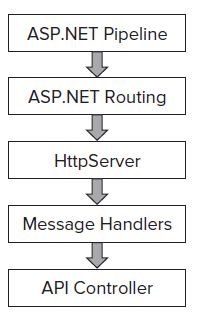

Routing configuration in WebAPI is slightly different than the ASP.NET MVC Routing. The WebAPI uses HttpRouteCollection and Route. The WebAPI team have reused the routing logic of MVC in WebAPI. The only reason why it’s a different routing is in order to keep the WebAPI from having its dependency on ASP.NET Routing the team decided to make it independent so that the WebAPI will not have ASP.NET class dependencies and can be hosted in console or windows service as self-hosting.
While in ASP.NET WebAPI routing, the system will not only register HttpRoute object but also it will create a wrapper Route object and in ASP.NET routing engine.
The significant difference that you can see here is you will not have access to Routing data in message handlers when you are trying to access the same in self-hosting , the reason is the route configuration is set and it will run at the later point in the life cycle.
The other significant difference between the ApiController and the normal MVC controller is with WebAPI ApiController, the actions are dispatched by default based on the HTTP request. However there is a flexibility to override the same so that the WebAPI will use the action name to select the action method within the ApiController.
What is Content Negotiation in Web API ?
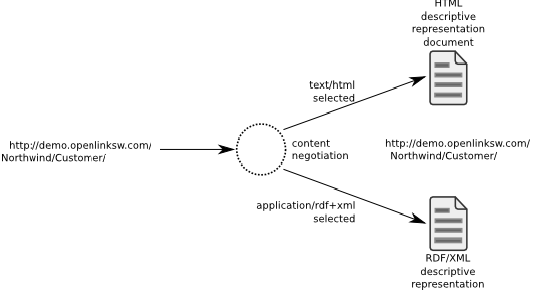
This is something which you will here frequently in Web Api. Content negotiation is the process of selecting the best representation for a given response when there are multiple representations available. The underling Web API framework implements the content negotiation and that is the reason why and how the client can request the data with a specific media type.
By default the Web API returns data in JSON format, however while requesting for a resource we can specify the media type to return so that the Web API knows what you are requesting for and selects proper formatter to output the data.
How to Implement Web API?
We shall see a generic implementation of Web API.
One has to create a class which derives from ApiController. The methods defined in the WebAPI controller maps to the HTTP methods. If you have a method name prefixed with GET, it means you are trying to return some data based upon the GET Request. You just have to make sure that whatever actions you are implementing must be prefixed with the right request type (GET, POST, PUT, and DELETE).
Note: The method named need not be Get () or Post () etc. However it does not limits to prefixing the request types , You can still implement the actions with different naming but one has to make sure to use the suitable action filters [HttpGet] , [Post] , [Put], [Delete].
Routing in ASP.NET Web API?
To determine which action to invoke, the framework uses a routing table. Below is the default route which is configured as a part of Global.asax
The routing is quite similar to what we define for MVC controllers
 Collapse | Copy Code
routes.MapHttpRoute(
name: "Default",
routeTemplate: "api/{controller}/{id}",
defaults: new { id = RouteParameter.Optional }
);
The Web API framework receives an HTTP request, it tries to match the URI against one of the route templates in the routing table. If no route matches, the client receives a 404 error.
Action Parameters in Web API simple types are taken from URI - Route data, query parameters.
Complex types come from the body - Configured MediaTypeFormatters are used to desterilize the request body based on the content type - JSON, XML and form-url-encoded are supported out of the box , also we can override using [FormUrl], [FormBody], [ModelBinder], custom parameter binding.
How to host a Web API ?
One can either go with self or web hosting.
• Self-hosting in any Windows process (e.g., console application or Windows service)
• Web hosting - using the ASP.NET pipeline on top of Internet Information Services (IIS) One has to make a reference and use the below ones if you are going with self-hosting.
Here is the code snippet for self-hosting Web API.
Collapse | Copy Codeusing System.Web.Http;
using System.Web.Http.SelfHost;
var config = new HttpSelfHostConfiguration("http://localhost:8080");
config.Routes.MapHttpRoute(
"API Default", "api/{controller}/{id}",
new { id = RouteParameter.Optional });
using (HttpSelfHostServer server = new HttpSelfHostServer(config))
{
server.OpenAsync().Wait();
Console.WriteLine("Press Enter to quit.");
Console.ReadLine();
}
In the above hosting, the application listens to the specified URL localhost 8080. One needs administrator privileges for that. If you are facing any issues like “HTTP could not register URL” then you will have to run the below statement in command prompt as Administrator
Collapse | Copy Codenetsh http add urlacl url=http://+:8080/ user=machine\username
How to manually run the content negotiation and why it’s required?
We have seen above the content negotiation is something which is built inside the WebAPI which will make use of formatters to decode and encode the HttpRequest and HttpResponses.
So the question comes when exactly we need to manually run the content negotiation logic. Here’s one that we can think of, say you are consuming a third party service which always returns the data in JSON format. Your client is accepting or willing to process xml based responses or maybe you have other clients consuming data in different formats like Json or xml. In such scenarios you can think of building a WebAPI as a wrapper around the services that you are consuming. Isn’t it meaningful to build something and return data based on the media type?
Below is the generic code which runs the content negotiation
Collapse | Copy Code// Get the IContentNegotiator
IContentNegotiator negotiator = Configuration.Services.GetContentNegotiator();
// Run content negotiation to select a formatter
MediaTypeHeaderValue mediaType;
MediaTypeFormatter formatter = negotiator.Negotiate(
typeof(Contact), Request, Configuration.Formatters, out mediaType);
// Create a response message with an object content using the selected formatter
HttpResponseMessage response = new HttpResponseMessage()
{
Content = new ObjectContent<contact>(contact, formatter),
RequestMessage = Request
};
Get the content negotiator instance and run the Negotiate method with the following parameters, the type of object you want to return, request object, the default formatters and out param for the media type. At last create a HttpResponseMessage and format the content as per the media formatter which is obtained while doing content negotiation.
Background
This article is just a start off, a beginner article for WebApi. Basic understanding of MVC is sufficient to understand and implement ASP.NET WebAPI.
Using the code
We shall create a very basic sample WebAPI project and host the same in console and make a request from browser. I am referring the example mentioned in http://www.asp.net/web-api/overview/hosting-aspnet-web-api/self-host-a-web-api
- First create a console project
- From NuGet manager , Search for ‘Microsoft.AspNet.WebApi.SelfHost’ and install the same
- Create a controller and make sure it should inherit from ApiController
- Implement required actions based on the HTTP verbs
- Now we are ready for hosting.
- In program.cs , create an instance of HttpSelfHostConfiguration by specifying the URL to listen, then set the default route map.
- Create an instance of HttpSelfHostServer with the above configuration and open the connection and wait for the client requests.
- Requesting for Products , just copy paste or type in the url - http://localhost:8080/Products in browser and hit enter. That's all you should be able to see the response.
When you are requesting for Products with the url - http://localhost:8080/Products , the GetAllProducts method of ApiController will serve the request. Similarly if you wish to get product by Id, you will have to pass the Id while making a request to Web Api controller. Here is an example http://localhost:8080/Products/1 , upon requesting the GetProductsById method will be invoked and it will return a single product based on the product Id.
Collapse | Copy Code public class ProductsController : ApiController
{
Product[] products = new Product[]
{
new Product { Id = 1, Name = "Tomato Soup", Category = "Groceries", Price = 1 },
new Product { Id = 2, Name = "Yo-yo", Category = "Toys", Price = 3.75M },
new Product { Id = 3, Name = "Hammer", Category = "Hardware", Price = 16.99M }
};
public IEnumerable<product> GetAllProducts()
{
return products;
}
public Product GetProductById(int id)
{
var product = products.FirstOrDefault((p) => p.Id == id);
if (product == null)
{
throw new HttpResponseException(HttpStatusCode.NotFound);
}
return product;
}
public IEnumerable<product> GetProductsByCategory(string category)
{
return products.Where(p => string.Equals(p.Category, category,
StringComparison.OrdinalIgnoreCase));
}
}
static void Main(string[] args)
{
var config = new HttpSelfHostConfiguration("http://localhost:8080");
config.Routes.MapHttpRoute(
"API Default", "api/{controller}/{id}",
new { id = RouteParameter.Optional });
using (HttpSelfHostServer server = new HttpSelfHostServer(config))
{
server.OpenAsync().Wait();
Console.WriteLine("Press Enter to quit.");
Console.ReadLine();
}
}
Now we will see another sample implementation of WebAPI handles GET, PUT, POST, DELETE requests. For demostration purpose , I have created a WebAPI based Contact Manager application.
Use case:
1. Ability to manage contacts , The user should be able to add/update/delete contacts.
2. Display all contacts in Home page.
Below is the Contacts Controller implementation. We are encapsulating all the CRUD operations in a repository named ContactRepository.
Collapse | Copy Code public class ContactsController : ApiController
{
private static readonly IContactRepository _contacts = new ContactRepository();
// Get All Contacts
public IEnumerable<contact> Get()
{
return _contacts.GetAllContacts();
}
// Get Contact by Id
public Contact Get(int id)
{
try
{
Contact contact = _contacts.GetContact(id);
return contact;
}
catch (Exception ex)
{
throw new HttpResponseException(Request.CreateResponse(HttpStatusCode.NotFound, ex.Message));
}
}
// Insert Contact
public HttpResponseMessage Post(Contact value)
{
try
{
if (ModelState.IsValid)
{
Contact contact = _contacts.AddContact(value);
var response = Request.CreateResponse<contact>(HttpStatusCode.Created, contact);
return response;
}
else
{
return Request.CreateResponse(HttpStatusCode.InternalServerError, "Model state is invalid");
}
}
catch (Exception ex)
{
return Request.CreateResponse(HttpStatusCode.InternalServerError, ex.Message);
}
}
// Update Contact by Id
public HttpResponseMessage Put(int id, Contact value)
{
try
{
_contacts.UpdateContact(id, value);
}
catch (Exception ex)
{
return Request.CreateResponse(HttpStatusCode.InternalServerError, ex.Message);
}
return Request.CreateResponse(HttpStatusCode.OK);
}
// Delete Contact by Id
public HttpResponseMessage Delete(int id)
{
try
{
_contacts.RemoveContact(id);
}
catch (Exception ex)
{
return Request.CreateResponse(HttpStatusCode.InternalServerError, ex.Message);
}
return Request.CreateResponse(HttpStatusCode.OK);
}
}
Below is the code for Contact Repository.
It is built on Entity Framework Code First Approch. The Repository is composed of ContactsDbContext , with it's help we are performing CRUD operations.
Collapse | Copy Code public class ContactRepository : IContactRepository
{
private ContactsDbContext context;
public ContactRepository()
{
context = new ContactsDbContext();
}
public IEnumerable<contact> GetAllContacts()
{
try
{
return context.Contacts.ToList();
}
catch
{
throw;
}
}
public Contact GetContact(int id)
{
try
{
return context.Contacts.SingleOrDefault(c => c.Id == id);
}
catch
{
throw;
}
}
public Contact AddContact(Contact item)
{
try
{
context.Contacts.Add(item);
context.SaveChanges();
return item;
}
catch
{
throw;
}
}
public bool RemoveContact(int id)
{
try
{
var contact = context.Contacts.SingleOrDefault(c => c.Id == id);
if (contact == null)
throw new Exception(string.Format("Contact with id: '{0}' not found", id.ToString()));
context.Contacts.Remove(contact);
context.SaveChanges();
return true;
}
catch
{
throw;
}
}
public bool UpdateContact(int id, Contact item)
{
try
{
var contact = context.Contacts.SingleOrDefault(c => c.Id == id);
if( contact == null)
throw new Exception(string.Format("Contact with id: '{0}' not found", id.ToString()));
contact.Name = item.Name;
contact.Email = item.Email;
contact.Phone = item.Phone;
context.Entry(contact).State = EntityState.Modified;
context.SaveChanges();
return true;
}
catch
{
throw;
}
}
}
public class ContactsDbContext : DbContext
{
public ContactsDbContext()
: base("name=ContactsDbContext")
{
}
public DbSet<contact> Contacts { get; set; }
}
Setting Up the Database for Managing Contacts
Open solution - WebApi-ManageContacts in Visual Studio and Following the below steps
1. (Optional Step) Open web.config and make changes to connection string "ContactsDbContext" if required.
2. Go to Tools -> Library Package Manager -> Package Manager Console
Run Update-Database command as show below, You should be able to see the command runs successfully without throwing any errors.
PM> Update-Database
Specify the '-Verbose' flag to view the SQL statements being applied to the target database.
No pending code-based migrations.
Applying automatic migration: 201302171855006_AutomaticMigration.
Running Seed method.
Specify the '-Verbose' flag to view the SQL statements being applied to the target database.
No pending code-based migrations.
Applying automatic migration: 201302171855006_AutomaticMigration.
Running Seed method.
Rendering contacts (MVC + Web Api Controller)
Here is a code snippet for HTTP GET verb. We are making an ajax request to get all the contacts. The request will hit the Home controller and it will execute "ContactsGrid" action. Within the action , we are creating an instance of WebAPI controller , get all the contacts and then return a partial view - ContactsGrid.
Collapse | Copy Codefunction GetContacts() {
$.ajax({
url: '/Home/ContactsGrid',
type: "GET",
success: function (response) {
$("#contactsGrid").html(response);
},
error: function (data) {
$("#contactsGrid").html(data.responseText);
}
});
}
Add contacts with Web Api
Below is the code snippet for adding a new contact. Here we are making a jquery request with the url to WebApi controller, passing the contact information by serializing the data as Json object in the HTTP Request body. The content negociation with in the WebApi will understand and decode the contact information.
Note - Set the proper content type while making a request. Below you can see the content type set to 'application/json'
Collapse | Copy Codefunction AddContact() {
var contact = {
Name: $('#Name').val(),
Email: $('#Email').val(),
Phone: $('#Phone').val()
};
$.ajax({
url: '/Api/Contacts',
type: 'POST',
data: JSON.stringify(contact),
contentType: "application/json;charset=utf-8",
success: function (data) {
alert('Contacts added successfully');
GetContacts();
},
error: function (data) {
alert('Problem in adding contacts:' + data.responseText);
}
});
}
Deleting contacts with Web Api
Below is the code snippet for deleting contacts. We make a jquery request with the url to the Web Api controller. You will also notice that by setting the request type to 'DELETE' , helps to execute Delete method in the Contacts Web Api Controller.
Collapse | Copy Codefunction DeleteContact(id) {
$.ajax({
url: '/Api/Contacts/'+ id,
type: 'DELETE',
success: function (data) {
GetContacts();
},
error: function (data) {
alert('Problem in deleting contacts:' + data.responseText);
}
});
}
Update contacts with Web Api
Below is the code snippet for updating the contacts. We are using Jquery model dialog, We will get the contact to update and then show up a dialog so that we can edit the contact. When we click on update button , we will make an Ajax request with the url to WebApi controller.
You can also notice the request type is 'PUT' and we are also serializing the contacts before making the request. If the update operation succeeds, we will call GetContacts() method so that it will update the contacts grid.
Collapse | Copy Codefunction EditContact(id) {
$.ajax({
url: '/Home/GetContactsById/' + id,
type: "GET",
success: function (response) {
$("#editContact").html(response);
},
error: function (data) {
$("#editContact").html(data.responseText);
}
});
$(dialog).dialog('open')
}
dialog = $("#editContact").dialog({
autoOpen: false,
resizable: false,
closeOnEscape: true,
show: "explode",
hide: "explode",
width: 300,
title: "Edit Contact",
buttons: {
Update: function () {
var contact = {
Name: $('#Name').val(),
Email: $('#Email').val(),
Phone: $('#Phone').val()
};
$.ajax({
url: '/Api/Contacts/' + $('#Id').val(),
type: 'PUT',
data: JSON.stringify(contact),
contentType: "application/json;charset=utf-8",
success: function (data) {
GetContacts();
},
error: function (data) {
alert('Problem in updating contacts:' + data.responseText);
}
});
$(dialog).dialog("close");
},
Cancel: function () {
$(dialog).dialog("close");
}
}
});
Web.config changes
In order to execute HTTP requests for DELETE, PUT etc we need to add the below mentioned line under <system.webserver> so that the application handles all type of requests.
<modules runallmanagedmodulesforallrequests="true">

 #8 Lock Screen:
 #7 Kid's Corner
 #6 Data Sense
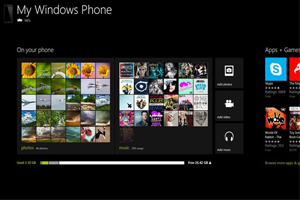 #5 Syncing your phone
 #4 Compatibility with Windows 8
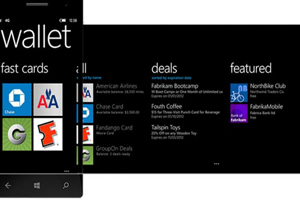 #3 Wallet and NFC
 #2 Photos and Camera
 #1 Music and Video